
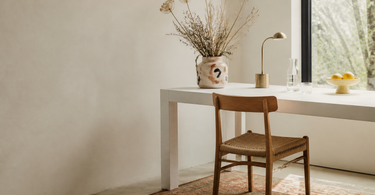
A well-functioning home office requires more than a desk and a chair. Daylight is your most important light source — place your desk close to a window. Keep the surface clutter-free with dedicated storage for cables and office supplies. Visually mark out the zone if you work in the living room. Plants reduce stress and improve concentration, according to repeated research. The wall behind you is your business card during video calls — keep it simple and personal.
The number of Danes who work from home, either full time or a few days a week, has risen markedly since 2020 and hasn't fallen back to the same level as before. This places new demands on the interior design: a home office shouldn't just exist — it should actively support your concentration, keep you organised and be a place you don't resist sitting down in. This guide covers the key elements from the desk surface to the room's acoustics, so you can create a workspace that actually works for you.
The desk as your starting point
The desk is the functional centre of your home office, and a clutter-free surface isn't about aesthetics — it's cognitive. Research on work environments shows that clutter on the desk increases cognitive load and makes it harder to switch focus between tasks. The principle is simple: only what you use daily belongs on the surface.
A ceramic pencil holder gathers pens, clips and highlighters in one place and prevents the slow build-up of small items that would otherwise spread across the whole desk surface. If you have a lot of cables and loose papers, a couple of dedicated boxes or baskets from a storage range is the most effective solution — things you can't see don't take up mental space either.
The desktop itself should be at least 120 cm wide if you work with two screens or a laptop plus an external monitor. The depth should be at least 60 cm to keep the screen at a distance of around 50-70 cm from your eyes, which is the ergonomically recommended distance to avoid eye strain.
Tip: Clear your desk at the end of the working day — not in the morning. If you finish with a clean surface, you'll significantly lower your resistance to getting started the next day. It rarely takes more than three minutes.
Home office in limited space
Few people have a dedicated room available. Many home offices are set up in part of the living room, in the bedroom or in a corner of the hallway — and that works fine if you work deliberately with the visual delineation of the zone.
Create a clear boundary
The brain is good at associating spaces with behaviour. If you work in the living room without any form of delineation, it becomes harder to "switch off" from work thoughts when you sit on the sofa in the evening. A rug under the desk chair is one of the cheapest and most effective ways to mark out the zone — it defines the work area without blocking light or requiring building projects.
A tall plant in a large plant pot cover can act as a natural room divider. A rubber plant or monstera at 140-160 cm provides a visual barrier that separates the work zone from the living zone, without cutting the room in two the way a wall would. Complement it with a round mirror on the wall in your work zone — it adds depth and makes a small corner feel more open.
Furniture that blends in
In a combined room, it's an advantage to choose a desk chair that matches the room's overall style, so the work zone doesn't feel like a foreign element. It's not about hiding the fact that you work, but about making the integration deliberate rather than random.
The wall behind you during video calls
Video calls are a permanent part of modern working life for many — and the wall behind you has become a daily business card to colleagues and clients. A blank white wall communicates nothing. Too much clutter communicates the wrong thing. The optimal approach is one to two objects that show personality and professionalism at the same time.
A single a poster in a frame is the easiest starting point: choose a motif you can actually stand behind, rather than something that just "looks office-professional". A shelf with two or three books and a small plant is another classic choice that signals a thought-out background without overdoing it.
Wall decoration in the form of a ceramic wall hanging or a relief piece works well in a video call context, as it adds texture and depth that looks interesting on screen — unlike flat graphics, which can appear two-dimensional.
Tip: Test your background by recording 10 seconds on your camera before your next meeting. What you see in the recording is exactly what others see — and it's surprisingly often different from what you imagine when you're sitting behind the screen.
Plants and atmosphere
More than 30 major studies have been carried out since the 1990s, consistently showing that plants in the workplace reduce stress levels, improve the subjective experience of air quality and increase self-reported concentration. It's not a decorating trend — it's biology.
The most robust indoor plants for a home office are those that thrive in low to medium light and don't need daily watering:
- Rubber plant (Ficus elastica) — tolerates shade well, water roughly every 10 days
- Monstera deliciosa — grows slowly and dramatically, water roughly weekly
- Peace lily (Spathiphyllum) — clearly shows when it needs water (droops a bit) and is easy to care for
- Cactus/succulents — needs minimal water, but does require good access to light
Place the plant within your field of vision — not behind you, where it won't be consciously registered throughout the day anyway. A colourful plant pot cover gives the plant an extra visual lift and is an easy way to add character to otherwise neutral corner spots.
Lighting that keeps you sharp
Light is the single factor most often underestimated in the home office — and the one that has the biggest direct effect on productivity and wellbeing throughout the working day.
Daylight as the primary light source
Natural daylight in the visible spectrum (approx. 380-700 nm) stimulates serotonin production and regulates your circadian rhythm. It's not a bonus — it's the ideal light source for work. Place your desk as close to a window as possible, and position it at right angles to the window (not with your back to it or facing it directly) to avoid reflections on the screen.
Artificial lighting as a supplement
Ceiling light as the sole light source creates harsh shadows and gives your eyes too little variation. A desk lamp with directional light solves the problem: 4000 Kelvin (neutral white light) is the optimal colour temperature for work — warm enough not to feel clinical, cool enough not to make you drowsy. You can supplement with a floor lamp or a pendant light that provides soft background lighting and eases the strain of contrast on your eyes.
If you have video meetings as a regular part of your day, lighting in front of you (between you and the camera) is crucial for image quality. A simple LED ring or a lamp placed just above eye level in front of you gives far better results than ceiling lighting from behind.
Sound and screening
Noise from others in the household, traffic or neighbours is one of the most commonly mentioned challenges of working from home. There are two principles you can work with: physical screening and absorption.
Soft surfaces absorb sound. A rug significantly reduces the reverberation time in the room — in a room with hard floors and white walls, the reverberation time (RT60) can easily exceed 0.5 seconds, giving a hollow, distracting sound experience. Textiles, bookshelves and a nearby sofa all help. A wall hangingcombines aesthetics with acoustic function and gives a real reduction in reflected sound.
When it comes to planning, it's worth mapping out which times of day are naturally quietest in your home — and reserving your most concentration-heavy tasks for these windows. It's a free solution that's often overlooked in favour of material ones.
Frequently asked questions
What's the most important element in a home office?
Daylight and ergonomics are the two factors with the greatest documented effect on productivity and wellbeing. Place your desk close to a window, and make sure your screen height and chair fit are correct. Tidiness and personal details like plants and art make the room somewhere you actually want to sit down in.
How do I keep my desk tidy over time?
Storage for all your items is the key requirement — if something doesn't have a fixed place, it ends up on the desk surface. Use a pencil holder for small items, dedicated baskets for cables and papers, and tidy up at the end of the day as a fixed routine. The fewer things left out, the lower the mental load when you sit down.
Can I set up a home office in the living room?
Yes — the key is visual separation. A rug under the desk, a tall plant as a room divider or a bookcase can mark out the work zone without needing physical walls. Choose furniture that matches the room's overall style, so the zone blends in rather than standing out. End your working day by "closing" the office — turn off the lamp and close the laptop.
Which plants work best in a home office?
Rubber plants, monstera and peace lilies are great choices for standard office lighting. They all cope well with medium to low light and need watering roughly once a week or less. Avoid plants with very specific light requirements unless you're supplementing with a grow lamp.
What's the ideal light temperature for work?
Around 4000 Kelvin (neutral white) is the most recommended colour temperature for office and focus work. It's cool enough to keep you alert, but not so cold (6500K+) that it feels clinical and uncomfortable. In the evening, it's a good idea to switch to warmer light (2700-3000K) to support your sleep rhythm.
What should I hang on the wall behind me for video calls?
One to two elements is plenty. A framed poster, a ceramic wall hanging or a shelf with a single plant and a couple of books all work well. Avoid a cluttered look or empty, bare walls. Test your background with your camera before the call — what you see in the footage is exactly what others see.
Summary
A well-functioning home office is the result of deliberate choices rather than randomly arranged furniture. Start with daylight and ergonomics — the two factors with the greatest documented effect. Build on this with tidy storage, a visually defined work zone and at least one plant in your field of view. Think of the wall behind you as a professional calling card during video calls, and address sound with soft textiles and rugs. Each of these elements solves a specific problem — together, they create a workspace you'll actually want to use.
Explore our range of home decor for the home office — from vases and desk details to rugs that define your work zone.